One project, two ways to work
The plugin ships as two surfaces: Skills, the methodology your AI harness runs step by step, and the SRS Navigator, a Copilot app that turns the resulting spec into a graph you refine together. Use either on its own, or both.
Skills
Ten AgentSkills walk a coding assistant from a customer problem to traceable requirements, one decision at a time.
- Business context, customer problems, needs, then functional requirements
- Every requirement traces back to the problem it solves
- Runs in GitHub Copilot, Claude Code, and Claude.ai
SRS Navigator
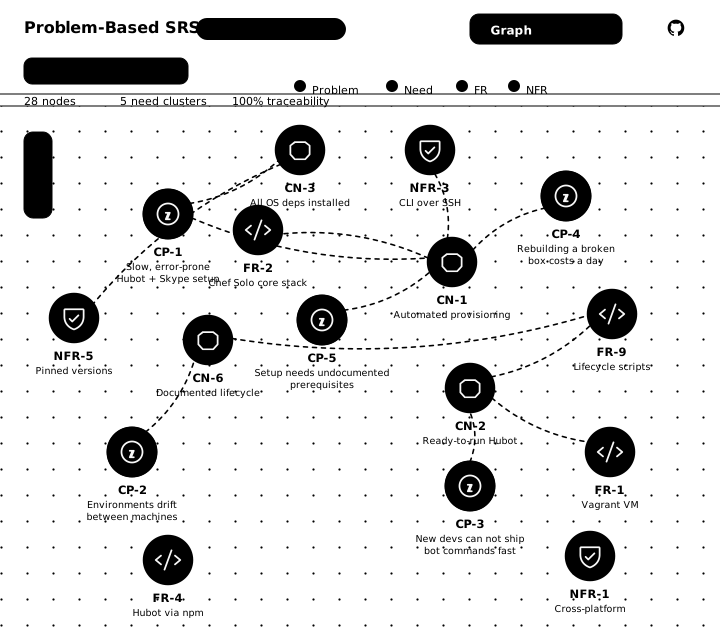
A Copilot canvas that renders your specification as an interactive graph, then lets you decompose and iterate on it with the agent, in place.
- CP Problem
- CN Need
- FR Requirement
- NFR Non-functional
- Force-directed graph of every artifact and its traceability
- Inline action bar to derive or decompose any node
- Health metrics surface orphaned problems and unmet needs
Most requirements start in the wrong place
"We need a CRM — with a mobile app and a dashboard."
Hand that to an AI agent and you get a feature list in seconds. Six months later nobody can say why the dashboard exists, which customer problem it closes, or what breaks if you delete it. The requirements were never written down — only the code was.
Problem-Based SRS reverses the order. The first artifact is not a feature. It is the problem, stated with the cost of leaving it unsolved:
CP.01 · Scattered Customer InformationSales teams waste valuable time searching for customer information across multiple disconnected systems.
The need follows from the problem, the requirement from the need. Each identifier names its parent, so the chain reads in both directions — forward to what you build, backward to why:
CP.01 CN.01.1 Centralized Customer Database FR.01.1.1 Contact and Company Management
That is not an illustration. It is .spec/crm-system.json, the specification shipped with the plugin: 5 problems, 7 needs, 12 requirements, 5 quality attributes, no orphans. Run /live and the SRS Navigator opens that graph.
How it works
Six steps. Each builds on the previous. Your AI assistant guides the conversation.
What governs this project?
Project identity, constraints, success criteria. Establishes principles for all downstream decisions.
/problem-based-srs business-contextWhat is broken, and for whom?
Identify and classify problems by severity: Obligation (must solve), Expectation (should solve), Hope (could solve).
/problem-based-srs problemsWhat might help?
High-level solution sketch. Components, boundaries, interfaces. Shared understanding before details.
/problem-based-srs software-glanceWhat must the system deliver?
Required outcomes per problem. Measurable, testable, scoped. Each need traces to a specific problem.
/problem-based-srs needsHow will it work?
Architecture, technical approach, constraints, stakeholder alignment. The technical roadmap.
/problem-based-srs software-visionWhat are the details?
Detailed, testable behavior specifications. Each requirement traces backward to a need and a problem.
/problem-based-srs functional-requirements/problem-based-srs command your assistant calls in the terminal.Every requirement traces backward. You can always answer: "Why are we building this?"
Not all problems are equal
The methodology classifies each problem by severity, so priority reflects actual impact.
High priority. Legal, contractual, or operational failure if unsolved. Build this first.
Medium priority. Degraded business outcomes if unsolved. Core value and user satisfaction.
Low priority. Missed improvement opportunity if unsolved. Build this last.
Your spec, as a living graph
The methodology also ships as a GitHub Copilot canvas. It renders every customer problem, need, and requirement as one connected graph, then lets you decompose and iterate on it together with the agent, without leaving the panel.
- Force-directed graph of every artifact and its traceability.
- Inline action bar to derive or decompose any node with the agent.
- Health metrics that surface orphaned problems and unmet needs.
/live against .spec/crm-system.json — the same 29 nodes the plugin ships with, not a mock-up.Get started
Install
Ask your AI assistant:
Install the Problem-Based SRS skills from RafaelGorski/Problem-Based-SRS into .github/skills/For Claude Code, use .claude/skills/ instead. Also listed on skills.sh (npx skills add RafaelGorski/Problem-Based-SRS). See the README for all installation methods.
Claude Code plugin
On Claude Code, add this repository as a plugin marketplace and install the plugin it lists — no clone required:
/plugin marketplace add RafaelGorski/Problem-Based-SRS
/plugin install problem-based-srs@problem-based-srs
Then /reload-plugins. Plugin skills are namespaced, so the methodology answers to /problem-based-srs:problem-based-srs.
Add the app
The SRS Navigator graph is a GitHub Copilot canvas extension, installed separately:
Install the canvas extension from https://github.com/RafaelGorski/Problem-Based-SRS/tree/main/.github/extensions/srs-navigatorThen run /live to open it. Prefer a file? Grab srs-navigator-<version>.zip from the canvas releases — the app has its own vX.Y.Z tags, so the newest release is usually not the one carrying it — and extract it into ~/.copilot/extensions/. The archive brings its own srs-navigator/ folder, so that is the parent directory, not the target. No npm install follows — the archive is self-contained.
Run your first session
/problem-based-srsDescribe your situation. The AI guides you through all six steps:
I need requirements for an inventory management system.
Our warehouse tracks everything in spreadsheets and loses $50k/month due to errors.
What you get
Traced artifacts from business context through functional requirements, stored in your project's .spec/ directory. Every requirement links back to the customer problem it solves.
Command & actions
One command, /problem-based-srs, drives the whole methodology. Pass an action to run a single step, or run it with no action for the full walkthrough.
| Command | Purpose | Step |
|---|---|---|
| /problem-based-srs | Full methodology, all steps | All |
| /problem-based-srs business-context | Project identity and constraints | 0 |
| /problem-based-srs problems | Identify and classify problems | 1 |
| /problem-based-srs software-glance | Sketch solution approach | 2 |
| /problem-based-srs needs | Define required outcomes | 3 |
| /problem-based-srs software-vision | Architecture and scope | 4 |
| /problem-based-srs functional-requirements | Detailed, testable requirements | 5 |
| /problem-based-srs validate | Verify traceability across artifacts | Validate |
| /problem-based-srs complexity | Axiomatic Design quality analysis | Optional |
Works with AgentSkills-compatible tools: GitHub Copilot, Claude Code, Claude.ai, Gemini CLI, and others.
Research and standards
Based on the methodology by Gorski & Stadzisz, published as peer-reviewed research.
DOI: 10.21529/RESI.2016.1502002
Requirement-writing guidance aligns with ISO/IEC/IEEE 29148:2018 for requirement quality, structured syntax, and bidirectional traceability. Normative keywords follow BCP 14 (RFC 2119 / RFC 8174) when written in ALL CAPITALS.
Case studies: CRM system walkthrough and renewable energy system walkthrough.